


Thomson Reuters

How AI changes product classification, step by step

Traditional manual classification, compared with ONESOURCE Determination

Commodity code classification has always relied on a person reading product specs, checking a nomenclature, and defending a code if it’s ever questioned. Thomson Reuters® ONESOURCE Determination AI product classification keeps a person in charge of the final call, and removes most of the manual digging that used to sit in front of it.

The six steps below compare how the work happens today against how it happens with ONESOURCE Determination.

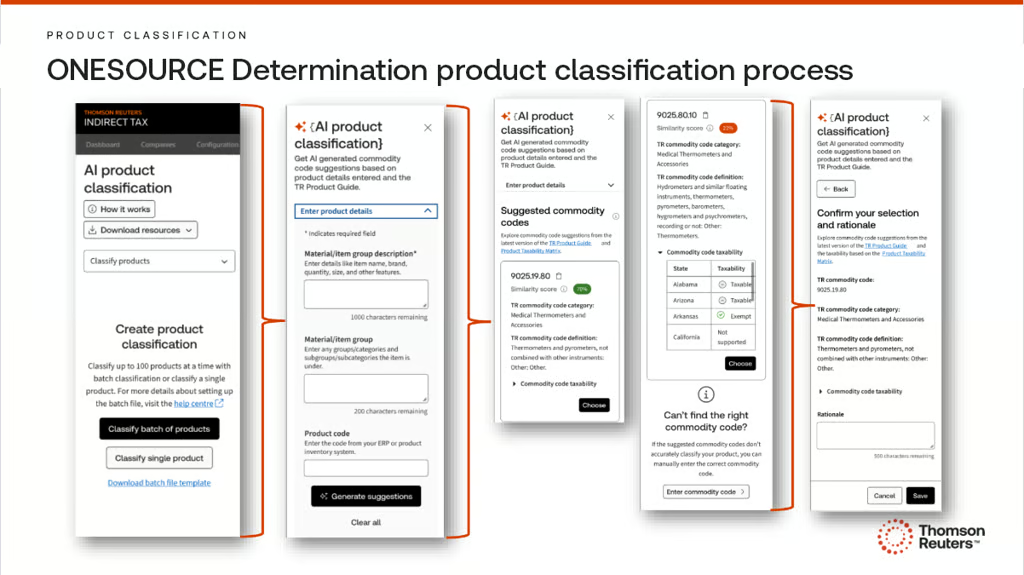
ONESOURCE Determination product classification screens: entering product details, AI-suggested commodity code 9025.19.80 with state taxability, and confirming the selection with a rationale

ONESOURCE Determination · AI product classification workflow

Keep in mind

AI-generated classifications are not legal or tax advice. A qualified professional must verify accuracy and legal compliance before classifications are used in production.

Access requirement

A Company Administrator must assign the Product Classifier role before a user can see or use this feature in ONESOURCE Indirect Tax.

Step-by-step comparison

Step 1

Enter product details

Gather what makes the product what it is: function, composition, materials, and intended use, before anything gets a code.

Traditional/manual

Chasing the details down by hand

A classifier pulls specs from PDFs, spreadsheets, and technical drawings, and follows up with engineers or suppliers to fill in what’s missing.

  • Tools: Spreadsheets, email threads, basic text editors

  • Time: Hours to days per complex product

  • Accuracy: Prone to gaps and inconsistent detail between products

  • Pain point: Repeated information requests slow every new item down

ONESOURCE Determination

One guided entry, grounded in the Thomson Reuters Product Definitions Guide

Enter a material or item group description and product code once. The suggestions that follow are generated against the Thomson Reuters Product Definitions Guide, not a blank page.

  • Tools: Guided intake form tied to the Thomson Reuters Product Definitions Guide

  • Time: Minutes per product

  • Accuracy: Structured fields cut down on missing or inconsistent detail

  • Pain point solved: One consistent intake replaces repeated back and forth

Step 2

Generate commodity code suggestions

Match the product’s function and composition to a commodity code, and rank how close each candidate really is.

Traditional/manual

Research against the nomenclature from memory

A classifier works through HS chapters, section notes, and past rulings, then drafts candidate codes based on judgment and experience.

  • Tools: HS nomenclature references, judgment, past experience

  • Time: 15 to 30 minutes per product

  • Accuracy: Varies with the classifier's experience and interpretation

  • Pain point: New classifiers need significant training time to get consistent

ONESOURCE Determination

Ranked codes with a similarity score

AI suggests commodity codes with a similarity score attached to each one, so the classifier knows how much confidence to put in each option before choosing.

Example similarity scores

Suggested code A

70%

Suggested code B

22%

  • Tools: Pattern recognition scored against prior classifications

  • Time: Minutes per product

  • Accuracy: Consistent scoring reduces subjective, one-off calls

  • Pain point solved: Cuts training time for new classifiers by learning from prior decisions

Steps 1 and 2 also work at scale

Everything above also runs as a batch. Upload a CSV of up to 1000 products at once (20 MB limit) using a simple three-column template: description, item group, and product code. The same AI suggestions come back for every row at the same time.

  • Up to 3 ranked suggestions per product, same as single classification

  • Bulk actions like “Apply selected commodity code” across many rows at once

  • This is the workflow behind testing 1000 products in under 6 minutes

Step 3

Check taxability by jurisdiction

A code alone doesn’t say whether a product is taxable in a given state or country. That still needs checking.

Traditional/manual

State by state, source by source

Taxability gets checked one jurisdiction at a time, often across separate tariff schedules and tax authority sites, with no single place holding the full picture.

  • Tools: Individual tariff schedules and manual research

  • Time: 5 to 20 minutes per product, depending on jurisdiction count

  • Accuracy: Uneven, since source data isn’t equally available everywhere

  • Pain point: Country and state specific rules add real research overhead

ONESOURCE Determination

One taxability table per code

Choosing a code opens its taxability by state, checked against the Thomson Reuters Product Taxability Guide.

Example taxability by state

Alabama

Taxable

Arizona

Taxable

Arkansas

Exempt

California

Not supported

  • Tools: Thomson Reuters Product Taxability Guide, surfaced inside the same screen

  • Time: Under a minute per code

  • Accuracy: Same matrix applied consistently across every jurisdiction

  • Pain point solved: Removes the country-by-country lookup step entirely

Step 4

Resolve codes that don’t quite fit

Not every product matches a suggestion cleanly. Both processes need a way forward when that happens.

Traditional/manual

Keep researching until something fits

When no candidate code is a clean match, the classifier goes back to the nomenclature and keeps digging until they can defend an answer.

  • Tools: Additional manual research, second opinions from colleagues

  • Time: Open ended, can extend to hours for an unusual product

  • Accuracy: Depends entirely on how far the classifier is willing to dig

  • Pain point: Edge cases stall the whole batch behind them

ONESOURCE Determination

A manual entry path, built in

If the suggested codes don’t fit, “Can’t find the right commodity code” lets the classifier enter one directly, so an edge case never becomes a dead end.

  • Tools: Manual override field, inside the same workflow

  • Time: A few extra minutes, without leaving the tool

  • Accuracy: Classifier judgment still decides, and nothing gets forced into a poor fit

  • Pain point solved: Edge cases move through the same batch instead of stalling it

Step 5

Confirm the code and record a rationale

Every classification needs a reason behind it that will hold up if it’s ever reviewed.

Traditional/manual

Notes wherever they happen to land

The reasoning behind a code often lives in an email thread, a personal file, or a classifier’s memory, with no single, consistent record.

  • Tools: Spreadsheets, internal file shares, personal notes

  • Time: Ongoing, informal upkeep

  • Accuracy: Rationale can be incomplete or hard to find months later

  • Pain point: Audit prep means reconstructing decisions after the fact

ONESOURCE Determination

Rationale saved with the code, by design

The classifier confirms the selected code and writes a short rationale directly into the record, which is saved alongside the classification for later review.

  • Tools: Built-in rationale field. The Saved classified products tab lets you filter, edit, and export the full history to Excel

  • Time: A couple of minutes, as the final step

  • Accuracy: Comprehensive, consistent record across every product

  • Pain point solved: Audit prep draws on records that already exist

Step 6

Map the classified product into your tax engine

A saved classification still needs to reach the systems that actually calculate tax. That’s a separate step, and it’s easy to let it become its own bottleneck.

Traditional/manual

Re-entering the same code a second time

Once a product has a code, someone still has to key it into the company’s ERP or tax mapping tables, one product and one company at a time, duplicating work that’s already been done.

  • Tools: Manual entry into ERP or mapping tables, company by company

  • Time: Ongoing, a few minutes per product, every time

  • Accuracy: Risk of the mapped code drifting from the classified code over time

  • Pain point: A second manual step after the classification work is already finished

ONESOURCE Determination

Saved classifications map in bulk

Select one or more saved classifications, pick the company and the product and services mapping group, confirm the product code and effective dates, and add them to Standard Mapping without leaving the tool.

  • Tools: Add to standard mapping action, applied across multiple products at once

  • Time: Minutes, regardless of batch size

  • Accuracy: The confirmed code and rationale carry straight into the mapping, nothing re-keyed

  • Pain point solved: Removes the duplicate data entry step between classifying and mapping

Business impact

Beyond the six steps above, teams that move off manual classification see the change show up across growth, cost, risk, and staffing.

Accelerate growth

Speed up time to market with faster, more accurate product classification, and let teams launch products without bottlenecks.

Boost accuracy and efficiency

Achieve high-accuracy classification at scale, whether bulk or ad hoc, and strengthen downstream tax determination and reporting.

Cut operational costs

Simplify classification through automation powered by generative AI, reducing manual effort and freeing up resources.

Scale resources strategically

Let junior staff handle classification with confidence, freeing experienced staff for higher-value work.

Minimize risk and ensure compliance

Reduce error-prone manual work and lower the risk of invoice rejections, audit findings, and tax miscalculations.

Maximize ROI with faster implementation

Expedite ONESOURCE Determination deployment: tested to classify 1000 records in under 6 minutes.

Configurable to how your team works

Admins set how many AI suggestions appear per product, 3, 4, or 5, and can turn similarity scores on or off for every user on the tenant.

Overall shift across the six steps

1000

Products in 6 minutes

Bulk classification tested at scale, in place of one product at a time

From research to review

A tax professional still confirms every code, just without the manual digging that used to come first

Built-in

Audit trail

Rationale is saved with the code, not scattered across files

Request a demo or talk to a Thomson Reuters ONESOURCE specialist today.

Request a demo

© 2026 Thomson Reuters TR8989889/11-26

Thomson Reuters